How we gave a SaaS team a self-service blog with Keystatic, a free Git-backed headless CMS: no database, no monthly bill, no developer tickets to publish.
Key findings
Keystatic moved blog publishing off the engineering backlog: the marketing team writes, edits, and ships posts through a browser UI with zero developer involvement.
The CMS bill is $0. Keystatic's core is open source under the MIT license, content lives in the existing Git repo, and there is no database, no runtime API, and no per-seat fee.
The site stayed fully static. Saving a post commits Markdown to GitHub, Vercel rebuilds, and the change is live in about two minutes, with no headless API call at runtime.
SEO is enforced by the schema: per-post title, description, tags, and cover image are required typed fields, so no post ships SEO-incomplete.
The main limits are deliberate: no real-time co-editing on the free tier, image handling that either commits binaries to Git or moves to Keystatic Cloud, and a publish loop gated by build time rather than instant.
Publishing is where a fast marketing site quietly slows down: the page loads in milliseconds, but shipping a blog post takes a developer and a ticket. This is how we gave a SaaS client a self-service blog with Keystatic, a free, Git-backed headless CMS, so the marketing team could publish on its own schedule without giving up the site's static performance or paying for a hosted CMS.
Why did this SaaS need a self-service CMS?
The client runs a fast, statically generated Astro marketing site that mirrors the product's brand. It performed well and looked the part, but it had one operational gap: every blog post, every typo fix, and every new article meant a ticket to a developer. Content moved at the speed of the engineering backlog, not the marketing calendar.
That is a common failure mode for a site built the modern way. Static generation is excellent for performance and SEO, but it assumes content changes flow through the codebase, and a marketing team should not have to open a pull request to fix a headline. The practical cost was twofold: editorial output was capped by developer availability, and engineers were pulled off product work to paste in copy.
At DesignKey Studio, we treated this as a workflow problem, not a rebuild. The brief was narrow and firm: let non-technical authors write, edit, and publish independently; keep the site fully static so performance and SEO stay intact; add no recurring CMS bill and no new system to operate; and keep every post version-controlled and reviewable. The tension in that brief is the interesting part. A hosted headless CMS solves self-service but adds a monthly cost, a second system, and a runtime API call. Editing raw Markdown in GitHub keeps everything free and version-controlled but is a non-starter for someone who does not live in a code editor. We needed the authoring comfort of a real CMS with the operational profile of plain files in a repo. That is exactly the gap Keystatic fills.
What is Keystatic, and is it free?
Keystatic is a free, Git-backed headless CMS that stores content as files in your own repository instead of a hosted database. It is built by Thinkmill, the team behind KeystoneJS, and it keeps content as Markdown, MDX, YAML, or JSON files while giving authors a friendly browser UI to edit those files. The rich-text body is written to Markdoc, a Markdown-based authoring format, so what an author types stays a plain, diffable text file. There is no database to run, no API tokens to rotate, and nothing extra to host.
On cost, Keystatic is unusually clear: according to the project's repository, the core is open source under the MIT license, with no paid tier and no feature gating on the CMS itself. Because content lives in your repo, the CMS has no runtime infrastructure to bill for. There is an optional Keystatic Cloud with a free tier (up to three users per team, with GitHub authentication handled for you) and a Pro plan around $10 a month per team, plus roughly $5 per additional user, that adds hosted image optimization and experimental multiplayer editing. None of that is required to run Keystatic in production. For a small team editing a static site, the total CMS cost is genuinely $0.
Tier
Cost
What it adds
Keystatic (core)
Free, open source (MIT)
Git-backed CMS, TypeScript schema, local and GitHub editing modes
Keystatic Cloud Free
$0
Up to 3 users per team, simplified GitHub authentication
Keystatic Cloud Pro
~$10/mo per team (+ ~$5/mo per user beyond 3)
Hosted image optimization and CDN, experimental multiplayer editing
It supports three storage modes. Local mode edits files on your machine during development. GitHub mode connects the admin UI to a repo through a GitHub App, so authors publish from the browser and every save is a commit. Keystatic Cloud layers simplified auth and image hosting on top. Framework support is first-class for Next.js, Astro, and Remix, and the schema is defined in TypeScript, so the content model is type-checked alongside the rest of the app.
The way to place Keystatic against the better-known names is by architecture, not feature checklists. Sanity and Contentful are hosted platforms: your content lives in their cloud and is fetched over an API, which buys real-time collaboration and content reuse across many channels, at a recurring cost and with a runtime dependency. Keystatic is the Git-based pattern: content is files, saving is committing, and the published site can stay completely static. We compare all three in the alternatives section below.
What did we build?
We wired Keystatic directly into the client's existing Astro project rather than standing up a separate CMS. The blog became a typed content collection in the same repository as the site, and nothing about the static build changed; we added an authoring layer on top of the files the build already reads. The whole system has no moving server parts of its own: the admin UI is a route in the app, the content is files in the repo, and the published site is static.
Where content lives: the admin UI is a route in the Astro app, the repo is the source of truth, and the live site is static. No database, no runtime API.
That static architecture is the backbone; the publishing loop below is what an author actually experiences each time they hit save.
The publishing loop: save in the CMS, auto-commit to GitHub, auto-rebuild on Vercel, live in about two minutes.
The schema is the product
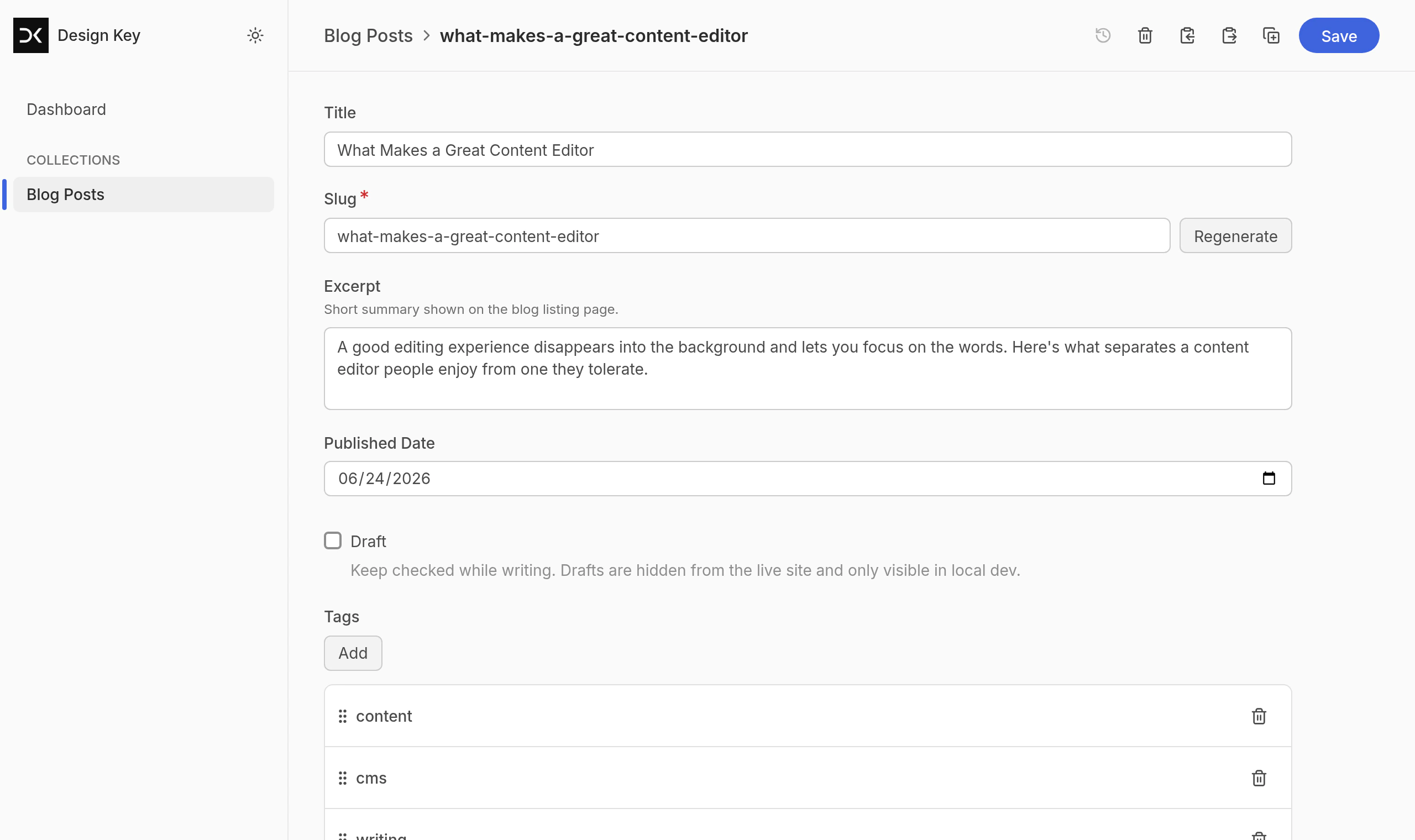
The most important decision was modeling the blog as a typed collection before writing any UI. Each post has a defined shape: title, excerpt, published date, tags, cover image, SEO title and description, and a draft toggle. Defining that schema in TypeScript means the fields an author sees in the CMS and the fields the site renders are the same source of truth, so the two cannot drift.
The payoff is that SEO stops being an afterthought. Because the SEO title, description, and cover image are first-class fields on every post rather than optional extras, a post cannot be published in an SEO-incomplete state. The schema does the enforcing, not a reviewer's memory.
Publishing is a commit
In GitHub mode, saving a post is a Git commit. When an author hits publish, Keystatic commits the Markdown file to the repository, which triggers a Vercel rebuild, and the regenerated static page goes live in about two minutes. That single design choice is what satisfies three of the brief's requirements at once: the content is version-controlled with full history and rollback, the review workflow is just Git, and there is no runtime CMS API because the content was baked into the static build.
The authentication is the one piece that needs setup. According to Keystatic's GitHub mode documentation, authors sign in with GitHub and write through a GitHub App that holds write access to the repo, so the commit is made as a real, attributable Git author rather than a shared service account. In config, switching from local editing to browser publishing is a single storage block plus a handful of environment variables:
# .env — issued once when the GitHub App is createdKEYSTATIC_GITHUB_CLIENT_ID=...KEYSTATIC_GITHUB_CLIENT_SECRET=...KEYSTATIC_SECRET=... # signs the auth sessionNEXT_PUBLIC_KEYSTATIC_GITHUB_APP_SLUG=...
The Keystatic editor exposes the typed schema as plain form fields.
Drafts that cannot leak
A draft flag keeps unfinished posts visible only in local development and excluded from the production build, so work-in-progress never appears on the live site. This matters more than it sounds: the most common way a static blog embarrasses a team is a half-finished post shipping because "save" and "publish" were the same action. Here they are not.
Authoring that a non-developer trusts
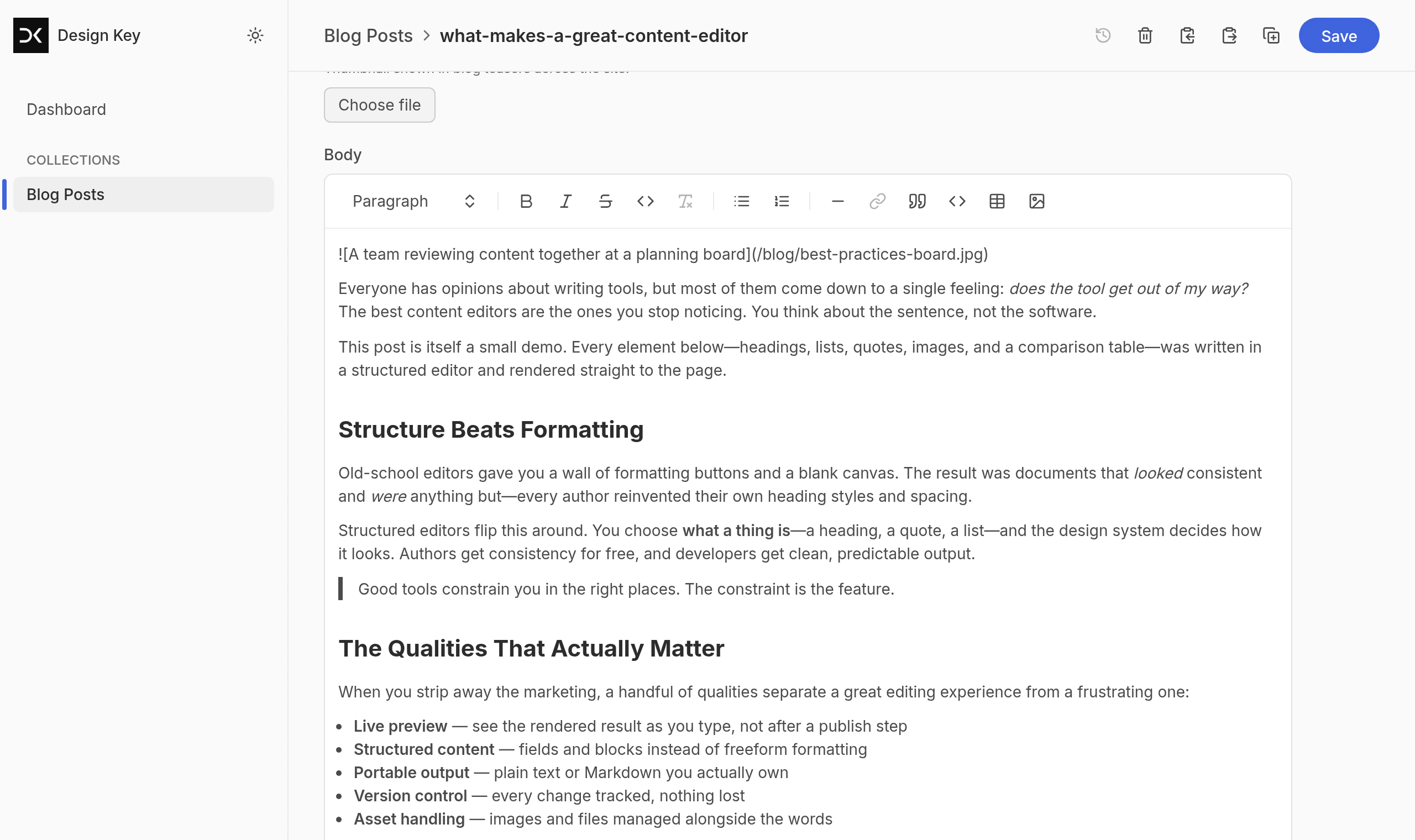
The body is edited in a WYSIWYG rich-text editor that handles headings, lists, quotes, links, code blocks, images, and tables, and writes clean Markdoc underneath. Authors never see raw Markdown or the repo. We also reused the landing page's existing design tokens for the blog listing and post templates, so published content looks native to the site rather than bolted on. The result is that a marketing writer gets a real CMS experience, while the output is still a reviewable text file in Git.
The rich-text editor writes clean Markdoc, so authors never touch raw Markdown.
Where did Keystatic excel?
The clearest win was cost against capability. A hosted headless CMS with comparable authoring comfort would have added a recurring bill and a second system to operate; Keystatic delivered the same self-service experience for a $0 CMS spend, because content lives in the repo and there is no database or API to pay for. Over a multi-year site life, that is the difference between a line item that compounds and one that never appears.
The second win was that the site stayed exactly as fast as it was. Because publishing bakes content into the static build rather than fetching it from an API at runtime, there was no performance or SEO regression to manage, no API latency on the critical path, and nothing new that could go down and take the blog with it. The publish loop settled at about two minutes from save to live, which is well inside a marketing team's tolerance.
The third win was leverage from version control. Every post is a commit, so history, review, rollback, and blame come free from Git rather than from a CMS feature the client would otherwise pay for. Key takeaway: by choosing the Git-based pattern, we turned "content management" into "files in the repo the team already trusts," which removed an entire category of runtime risk and recurring cost instead of just relocating it.
Where did it struggle?
Before you commit to the Git-based pattern, pressure-test three things: whether more than one person needs to edit the same post at once (no free real-time co-editing), where images will live (committed binaries bloat the repo, or you pay for Keystatic Cloud), and whether a two-minute build-and-deploy loop is acceptable instead of instant publishing. None of these blocked this project, but each is a hard edge, not a bug.
The trade-offs are real and worth planning around. Collaboration is the biggest one: because saving is committing, Keystatic's free, Git-based model is deliberate and single-threaded rather than real-time, so two people editing the same post simultaneously is not the smooth, presence-aware experience Sanity or Contentful offer. Multiplayer editing exists only as an experimental Keystatic Cloud feature. For a small team publishing sequentially, this was a non-issue; for a large newsroom, it would be a constraint.
Images are the other rough edge. Keeping the site free and static means image binaries get committed to the Git repo, which bloats it over time, or you adopt Keystatic Cloud for hosted image optimization, which reintroduces a small cost. There is no free lunch on media. Two smaller frictions: publishing is gated by build time, so "live in about two minutes" is fast but not instant like an API-driven CMS, and the whole model is coupled to GitHub, so the auth and workflow assume that host. None of these blocked the project, but each is a question worth asking before committing to the Git-based pattern.
What are the alternatives to Keystatic?
The category splits three ways, and the honest differentiator is how much you have to operate. TinaCMS is the closest Git-based competitor: its standout is live visual editing on the rendered page, but it runs a GraphQL layer and typically needs Tina Cloud or a self-hosted Tina backend to handle GitHub authentication in production. Decap CMS (formerly Netlify CMS) is the mature, framework-agnostic Git-based option, fully free and open source, but it also needs an OAuth backend (Netlify Identity or a self-hosted proxy) and its authoring UI feels dated next to Keystatic's. On the hosted side, Sanity is the developer-favorite platform (real-time collaboration, structured content, the GROQ query language, a free tier that becomes usage-based at scale), and Contentful is the enterprise choice built around governance and roles.
For this client - a developer-led team, one fast marketing site, a handful of authors, and a hard constraint of no recurring bill - the deciding factor was operational weight. Keystatic's GitHub mode needs no separate backend to host: the admin UI mounts as a route in the Astro app and commits through a GitHub App, where Tina and Decap would each add a service to run and keep alive. That, plus a schema defined in plain TypeScript, made Keystatic the lightest fit, and the Git-based category as a whole the right call over the hosted platforms.
CMS
Model
Backend to run in production
Cost
Keystatic
Git-based, files in repo
None extra: GitHub App plus a route in your existing app
Free (MIT); Cloud from $0
TinaCMS
Git-based, with a GraphQL layer
Tina Cloud or a self-hosted Tina backend
Free OSS; Tina Cloud free tier, then paid
Decap CMS
Git-based (ex-Netlify CMS)
An OAuth backend (Netlify Identity or a self-hosted proxy)
Free OSS
Sanity
Hosted API + content lake
Vendor-hosted (Sanity's cloud)
Free tier, then usage-based
Contentful
Hosted API SaaS
Vendor-hosted (Contentful's cloud)
Paid, enterprise-tier
Frequently asked questions
Is Keystatic free?
Yes. Keystatic's core is open source under the MIT license, with no paid tier, no feature gating, and no per-seat cost, because content lives in your own Git repository and there is no hosted database to rent. The optional Keystatic Cloud has a free tier (up to three users per team, with GitHub authentication handled for you) and a Pro plan around $10 a month per team that adds image hosting and multiplayer editing. For a static site edited by a small team, the total CMS bill can genuinely be $0.
Keystatic vs Sanity - which should a SaaS marketing site use?
They are different architectures. Keystatic is Git-backed: content is Markdown and YAML files committed to your repo, with no database and no runtime API, which keeps a static site fully static. Sanity is a hosted content platform: your content lives in Sanity's cloud and is fetched over an API, which enables real-time multi-editor workflows and structured content reuse across many surfaces. For a single fast marketing site edited by a couple of people, Keystatic is simpler and free; for a large content operation feeding web, mobile, and email at once, Sanity's hosted model earns its cost.
Keystatic vs Contentful for a SaaS site - what is the difference?
Contentful is an enterprise-grade hosted headless CMS built around governance, roles, and a content API, and it is priced accordingly once you leave the free tier. Keystatic is a free, Git-based CMS with content stored as files in your repo and no recurring bill. Contentful makes sense when you need enterprise workflow controls and are already paying for a martech stack; Keystatic makes sense when a developer-led team wants version-controlled content, zero runtime dependencies, and no monthly fee for a marketing site.
Does Keystatic need a database or an API server?
No. Keystatic stores content as Markdown, MDX, YAML, or JSON files inside your Git repository, so there is no database to run, no API tokens to rotate, and nothing extra to host. The admin UI reads and writes those files directly (locally) or commits them to GitHub. At build time your framework reads the files like any other source, which is what lets the published site stay fully static.
What frameworks does Keystatic work with?
Keystatic has first-class support for Next.js, Astro, and Remix, and its content can be read by any tool that can read files from the repo. We used it with Astro on a statically generated marketing site. The admin UI mounts as a route in the app during local editing, and in GitHub mode it authenticates against the repo so authors can publish from the browser.
Can non-developers publish with Keystatic without touching code?
Yes. Authors work in a browser-based admin UI with typed fields and a rich-text editor, never in raw Markdown or the codebase. Saving a post commits the change to GitHub, which triggers a rebuild, and the post is live in about two minutes. The developer defines the content schema once in TypeScript; after that, publishing is entirely self-service.
Related research and services
We built this publishing workflow as part of our SaaS development work, and the Astro build and brand-matched templates came out of the same front-end development practice. If you are weighing a headless CMS for a marketing site and want the trade-offs mapped to your stack, scope a CMS integration with us.