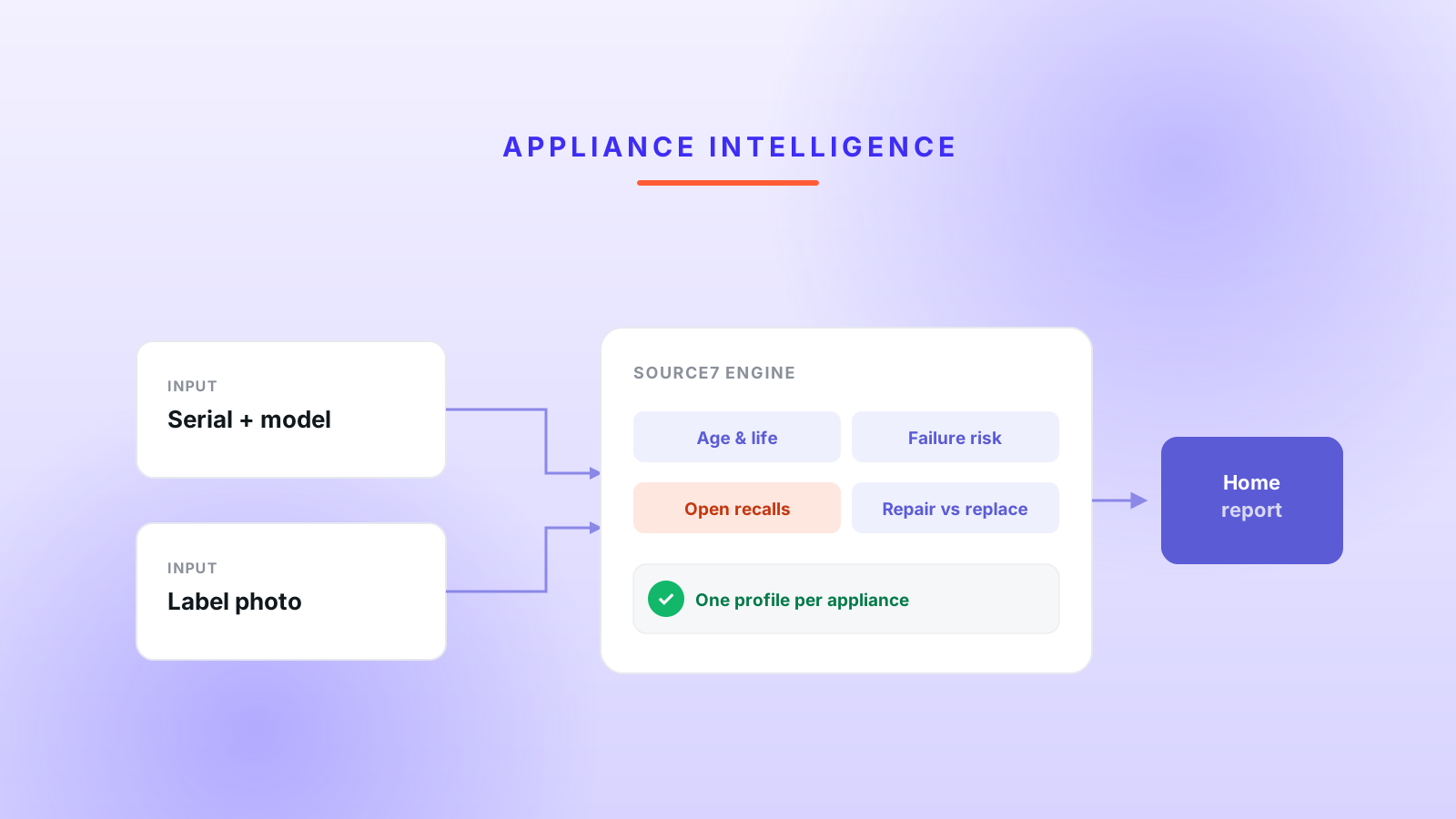
How a home-report platform turns an appliance's serial number into its age, failure risk, and open recalls with the Source7 intelligence engine and label OCR.
TL;DR / Key findings
A home-report platform enriches every major appliance in a house with the Source7 API, turning a serial number and a photo into an appliance's age, expected life, failure-risk score, and any open safety recalls.
The "intelligence" is entirely vendor-side. There is no AI model in the app; Source7's engine does the lifespan estimation, failure scoring, recall matching, and the label OCR (optical character recognition, reading text off the nameplate photo).
One appliance takes a two-phase call - create, then evaluate with the s7evaluate flag - plus a one-time 1500 ms re-poll when the engine returns identity before its analytics have finished computing.
A paid report evaluates every eligible appliance in its own settled promise, so a single failed lookup is counted and skipped but never aborts the report.
Results are persisted to Postgres (scalar columns plus a JSONB blob) and reused by appliance uid, so the engine is paid for once; exact-match recalls trigger an email and push alert.
11
appliance categories mapped to the engine
3
attempts max per call (1 + 2 retries)
1500 ms
one-shot re-poll for late analytics
exact
match only: recalls filtered to the unit
A furnace, a water heater, and a fridge are the most expensive surprises in a house, and the least legible. This is a look at how a home-report platform made them legible with Source7, an appliance-intelligence API: for each major appliance it sends whatever identifying data it has - a serial number, a model, a brand, sometimes just a photo of the nameplate - and gets back the appliance's age, how much life it has left, a failure-risk score, and any open safety recalls. The interesting engineering is not the data model. It is a two-phase call with a re-poll to catch analytics that finish late, a batch build that refuses to fail when one appliance does, and a careful line between what the vendor computes and what the app is responsible for. The writeup covers what Source7 does, where the intelligence actually lives, how the client is built, how it behaves across real report builds, and the compromises baked in.
The intelligence is the vendor's product. The engineering that matters is feeding it clean inputs and never letting it break a report.
What does the Source7 appliance-intelligence engine actually do?
Source7 is a third-party REST API that turns partial appliance identifiers into a full lifecycle and risk profile. The platform sends what it knows about an appliance - a product type, a brand, a model number, a serial number, a manufacture date, or a photo of the label - and Source7 returns a structured record: the appliance's age, its expected and remaining life, a failure-risk score, an insights block (a Low/Medium/High risk category, a twelve-month failure rate, warranty-coverage likelihood, and a repair-versus-replace decision guide), and arrays of open recalls and class actions.
The value is that none of this is knowable from the appliance itself. A homeowner cannot look at a water heater and know it is a year past its expected life, or that its exact model and manufacture window fall inside an open recall. Source7 encodes that knowledge and exposes it per unit. For a home report that a buyer pays for, an aging, recalled furnace is exactly the kind of finding that justifies the report.
It sits alongside a separate property-data integration: CoreLogic supplies the house envelope (year built, roof age, tax, ownership), covered in the resilient CoreLogic client writeup, while Source7 supplies the appliances inside it. The two are independent and, as shown below, independently fail-soft.
Where does the intelligence live - is any of it AI in the app?
None of the intelligence runs in the application; it is all Source7's. This is worth stating plainly because "intelligence engine" invites the assumption that the app is running a model. It is not: there is no AI SDK in the dependency list and no model id, prompt, or inference call anywhere in the codebase. The lifespan estimate, the failure-risk score, the recall matching, and the label reading are all computed on Source7's side.
The engine surfaces through two switches in the API contract. The first is an s7evaluate query flag: sending it tells Source7 to run its analytics and populate the derived fields, rather than just echoing back the identifiers. The second is vision: attaching a label photo with a read_label flag makes Source7 OCR the manufacturer's nameplate and return the model, serial, and brand it read. OCR (optical character recognition) is the step that turns a phone photo of a sticker into structured text.
That division of labor keeps the app's responsibilities narrow and testable. It sends inputs, validates the response structurally (TypeScript types and null-coalescing, not a model-output parse), and stores the result. The hard, domain-specific judgment lives with the vendor, which is the right place for it as long as the client treats the engine as fallible - which the rest of this writeup is about.
How does the app authenticate and call Source7?
The client is a small module of fetch-based functions that all route through one generic request helper, authenticated with a bearer token. There is no class-based service and no HTTP framework; each exported function (createS7Appliance, updateS7Appliance, getBrands) builds a payload and hands it to a private s7Fetch helper that owns auth, retries, and error shaping.
The layered architecture: two call sites share one client, which fronts the vendor engine; results land in Postgres and an exact-match recall fans out to a notification.
Auth is a bearer token read from SOURCE7_API_KEY and sent in the Authorization header. According to the OAuth 2.0 Bearer Token Usage spec (RFC 6750, published October 2012), a bearer token is a credential that any party in possession of it can use, sent in the Authorization: Bearer header - which is exactly why where that key lives matters (see the gotchas). The base URL is https://api.source7.io/v3, and the app maps its own 11 appliance categories to Source7's numeric product-type ids before calling.
const S7_BASE_URL = 'https://api.source7.io/v3';const MAX_RETRIES = 2;const INITIAL_BACKOFF_MS = 500;async function s7Fetch<T>(path: string, init: RequestInit): Promise<T> { const apiKey = process.env.SOURCE7_API_KEY; if (!apiKey) throw new Source7Error('SOURCE7_API_KEY is not configured', 500); let lastError: unknown; for (let attempt = 0; attempt <= MAX_RETRIES; attempt++) { if (attempt > 0) { const delay = INITIAL_BACKOFF_MS * Math.pow(2, attempt - 1); // 500ms, then 1000ms await new Promise((r) => setTimeout(r, delay)); } const res = await fetch(`${S7_BASE_URL}${path}`, { ...init, headers: { Authorization: `Bearer ${apiKey}`, 'Content-Type': 'application/json', ...init.headers, }, }); if (res.ok) return (await res.json()) as T; const err = await readS7Error(res); // parses { errors, warnings } from the body if (res.status === 429 || res.status >= 500) { lastError = err; continue; } throw err; // other 4xx are the caller's problem; no point retrying } throw lastError ?? new Source7Error('Source7 request failed', 500);}
Retries are bounded and selective: up to two retries on a 429 or a 5xx, and no retry on any other 4xx. The Source7Error it throws carries the HTTP status plus the errors and warnings arrays Source7 returns in its JSON body, so a caller can tell a not-found from a bad request from an outage.
How does one appliance turn into a full profile?
One appliance takes a two-phase call - create, then evaluate - with a conditional third call to catch analytics that finish late. The create call registers the appliance with Source7 and, on the first run, can attach a base64 label photo flagged for OCR; it returns an appliance uid and any model or serial the engine read off the label. The evaluate call then re-sends the appliance with s7evaluate=true, which is what makes the engine compute age, expected life, failure risk, and recalls.
The create-then-evaluate lifecycle, with the one-shot 1500 ms re-poll for when identity returns before the engine's analytics have finished.
The re-poll is the detail worth stealing. In practice the engine sometimes returns a fully identified appliance whose lifecycle fields are still null, because the analytics populate a beat after identification. Rather than accept a half-empty profile, the client waits 1500 ms and calls evaluate once more, but only when it is worth it: brand and model resolved, yet expected_life is missing. It is a pragmatic workaround for an asynchronous engine, capped at a single extra attempt so it cannot loop.
// 1. Register the appliance (first pass may OCR a label photo).const created = await createS7Appliance(input, { readLabel: firstRun });// 2. Run the analytics engine.let out = await updateS7Appliance(created.appliance_uid, evalPayload, { s7evaluate: true });// 3. Late-analytics re-poll: identity resolved, but lifecycle still null.if (out.brand_id && out.model_number && out.expected_life == null) { await new Promise((r) => setTimeout(r, 1500)); out = await updateS7Appliance(created.appliance_uid, evalPayload, { s7evaluate: true });}
How does a full report survive one bad appliance?
A report evaluates every eligible appliance independently, so one failed lookup is counted and skipped rather than allowed to sink the whole report. When a report is purchased, the build selects the property's appliances, filters them to the categories Source7 supports, and evaluates each one. Crucially, it collects the results with Promise.allSettled, so a rejected appliance becomes a settled rejected entry instead of an exception that unwinds the batch.
The report-build data flow: eligible appliances each run their own settled create-then-evaluate call, successes persist, and an exact-match recall fans out to an alert while one failure only ticks a counter.
Aspect
Interactive lookup
Report build
Entry point
POST /api/appliances/lookup
create-report.ts (on entitlement)
Trigger
user adds or edits an appliance
a report is purchased
Scope
one appliance
every eligible appliance on the property
s7evaluate
yes
yes, plus the one-time re-poll
Label OCR
not usually
yes, on the first run only
On failure
status passed to the UI (404 = not found)
fail-soft, counted, report still ships
Failing soft (degrading gracefully instead of erroring) is the right call here because the appliances are additive: a report with nine of ten appliances profiled is still worth what the buyer paid, whereas a report that refuses to generate because one obscure model choked is worth nothing. The failure count is logged so an outage is visible in aggregate, even though no single build surfaces it.
const settled = await Promise.allSettled( eligibleAppliances.map((a) => evaluateOneAppliance(a)),);let s7FailedCount = 0;for (const result of settled) { if (result.status === 'fulfilled') { await persistSource7Data(result.value); // scalar columns + data JSONB } else { s7FailedCount++; // logged in aggregate; the report still ships }}
How does Source7 read a model and serial from a label photo?
Source7 reads the nameplate itself when the client sends a label photo flagged with read_label, and returns the model, serial, and brand as vision_data. This matters because the single hardest input to get from a homeowner is an accurate model or serial number: they are long, they are on a sticker behind or under the appliance, and they are easy to mistype. A photo is far easier to capture than a transcription, and the OCR turns it into the structured identifiers the engine needs.
The client treats the OCR result as a suggestion, not gospel. Manual entry, when a user provided it, takes precedence over what vision read; the OCR values fill the gaps. The resolved identifiers are folded back into the evaluate payload so the analytics run against the best available identity, and both the raw vision_data and the resolved fields are stored (the app also flags review_recommended when the engine is unsure). The photo is only sent on the first run, so re-runs do not pay to re-OCR a label that has not changed.
That precedence rule is a small but important piece of practitioner judgment: trusting OCR blindly would let a misread digit overwrite a serial a user typed correctly, and trusting the user blindly would waste the photo. Ranking them - human first, machine as backfill - gets the best of both without a confidence model.
How is the appliance data stored and reused?
Results are persisted to Postgres in two shapes and reused by appliance uid, so Source7 is queried as rarely as possible. The rich response is written into a JSONB column (appliances.data, holding the normalized source7Data, the appliance uid, and the vision blob), while the few fields the app reads on hot paths are denormalized (copied out of the blob into their own columns) as s7_age, s7_expected_life, s7_brand_id, and friends. JSONB (Postgres's binary JSON type) keeps the full record queryable without a rigid schema; the scalar columns keep list views fast.
Two caches sit on top. The Source7 appliance uid is stored, so a later report build that finds an existing uid skips re-creation and only re-evaluates - the engine work is bought once per appliance, not once per report. Brand dropdown lists, which never really change, are cached client-side with React Query. According to the TanStack Query documentation, a query configured with staleTime set to Infinity is never treated as stale and will not refetch, which is exactly the intent for a brand list that is effectively static within a session.
The property side mirrors this: a Source7 property uid is stored on the property row so the appliance calls can be associated with a single property record. The result is that a repeat report on the same home is mostly database reads, with Source7 consulted only for genuinely new or changed appliances. This is the same build-versus-refresh caching discipline we apply across backend integrations.
How does it behave across three real scenarios?
The design is easiest to understand through the report builds it was made for. Three cases cover the range.
Scenario 1: a clean profile on the first evaluate
An appliance has a good serial and a mapped category. The create call registers it, the evaluate call returns a fully populated profile - age, expected life, a Medium risk category, no open recalls - and it is persisted with no re-poll. This is the common path, and because the appliance uid is now stored, the next report on this home will skip creation entirely and re-evaluate in a single call.
Scenario 2: identity now, analytics a beat later
The evaluate call returns a fully identified appliance (brand and model resolved from an OCR'd label) but with expected_life still null, because the engine's analytics have not finished. The client waits 1500 ms and evaluates once more; this time the lifecycle and risk fields are present. The homeowner sees a complete profile and never knows two round-trips happened. Had the client accepted the first response, the report would have shown a known appliance with a blank remaining life - the exact field the buyer cares about.
Scenario 3: one appliance fails, and another carries a recall
A rare model returns a 404 from Source7 while, in the same build, a dishwasher comes back with an exact-match recall. The 404 settles as a rejected result: s7FailedCount ticks up, that appliance is skipped, and the report ships with everything else intact. The dishwasher's recall passes the exact-match filter, so the build queues a recall_alert (email and push) next to the report_ready notification. One appliance quietly drops out; another triggers a safety alert. Neither outcome touches the rest of the report.
What are the risks and gotchas?
The design makes several deliberate compromises, and a couple of accidental ones, that matter for anyone auditing or extending it.
Warning - a live API key in the repo. A real SOURCE7_API_KEY value is committed to an .env.development file. A bearer token in version control is a leaked credential: anyone with repo access can call Source7 as this account, and rotating it means rewriting git history rather than flipping a secret. The key belongs in a secrets store, with only a placeholder in the committed env file.
There is no request timeout. The fetch calls set no AbortController or signal, so a hung Source7 socket relies on the platform default. According to MDN, fetch has no built-in timeout and needs an AbortController to cancel a stalled request. Under a serverless report build that evaluates appliances in sequence, one hung call can burn the whole function budget; retries and per-appliance fail-soft mitigate but do not bound wall-clock time.
Retries do not bound total time either. Two retries with 500 ms and 1000 ms backoff, on top of an untimed request, means a single flaky appliance can add several seconds to a build. There is no client-side concurrency cap, so a home with many appliances fans out without a throttle.
The 1500 ms re-poll is a fixed guess. It works, but it hard-codes an assumption about how long the engine's analytics take. If the engine is slower under load, one re-poll is not enough and the field stays blank; if it is faster, the wait is wasted. A signal from the engine (a status field, or a webhook) would beat a timer.
A failed lookup and an empty result look the same downstream. The mapper coalesces every missing field to Unknown or N/A, which is friendly for rendering but erases the difference between "the engine has no data" and "the call failed". An outage can therefore read as a house full of unknowable appliances rather than a system problem.
function mapS7ResponseToSource7Data(out: S7ApplianceOut): Source7Data { return { brandName: out.brand_name ?? 'Unknown', expectedLife: out.expected_life != null ? `${out.expected_life} years` : 'N/A', failureRiskCategory: out.insights?.failure_risk_category ?? null, // keep only recalls the engine marked as an exact match for this unit recalls: (out.recall_data ?? []).filter((r) => r.exact_match), classActions: out.class_action_data ?? [], };}
Exact-match recall filtering is safe but conservative. Keeping only exact_match recalls avoids false alarms, which is the right default for a notification that says "your appliance was recalled". The cost is that a genuine recall whose match Source7 rates as probable-but-not-exact is silently dropped, so the alert under-reports rather than over-reports.
What would we do differently?
Before the changes, it helps to weigh what the design already gets right against what it leaves open.
What the design gets right
Per-appliance fail-soft means one bad unit never sinks a paid report.
Create-then-evaluate plus OCR builds a profile from just a serial and a photo.
Results persist and re-runs reuse the appliance uid, so the engine is paid for once.
Exact-match recall filtering turns raw data into a real homeowner safety alert.
What still needs work
No request timeout, so a hung socket can stall a serverless build.
A live API key is committed to the repo.
The 1500 ms re-poll is a fixed guess, not driven by the engine's own signal.
A failed lookup and an empty result both coalesce to "Unknown".
The two highest-value changes are the two accidents: move the key into a secrets store, and wrap every fetch in an AbortController with a sane timeout so a hung call fails fast into the existing retry and fail-soft paths. Those alone turn the biggest operational and security risks into non-issues. Beyond that, distinguishing "lookup failed" from "no data" with an explicit status would stop outages from masquerading as unknowable appliances, and replacing the fixed re-poll with an engine-driven signal (a ready flag, or a webhook) would make the late-analytics handling robust under load. None of this changes the architecture; it hardens the edges, which is where an integration against a third-party engine earns its keep. Teams doing this kind of work often start with a focused API integration sprint or a short software development hardening pass.
Frequently asked questions
Is any of the appliance intelligence running inside the app, or is it all Source7's?
It is all Source7's. There is no LLM or AI model in the application: a repo-wide search for any AI SDK or model id turns up nothing. The lifespan estimate, failure-risk score, recall matching, and the label OCR are all computed vendor-side. The app's job is to send clean inputs, validate the response structurally, and store it.
Why does the client call Source7 twice for a single appliance?
The first call creates the appliance record (and, on the first run, can OCR a label photo to resolve the model and serial). The second call runs the analytics engine with the s7evaluate flag, which fills in age, expected life, failure risk, and recalls. A third call happens only as a one-time re-poll 1500 ms later when identity resolved but the lifecycle fields came back null.
What happens if one appliance lookup fails during a report build?
Nothing happens to the report. Each appliance is evaluated in its own settled promise, so a failure is counted (s7FailedCount) and skipped while every appliance that succeeded is still written and rendered. The property-level CoreLogic lookup fails soft independently, so neither integration can sink the report on its own.
How are appliance recalls surfaced to the homeowner?
Only recalls Source7 marks as an exact match for the specific unit are kept; near-matches are dropped. If any appliance in a finished report carries an exact-match recall, the build queues a recall_alert notification (email and push) alongside the report_ready notification, so a safety recall reaches the owner rather than sitting in a data blob.
Does the client protect against a hung Source7 request?
Only partly. It retries up to twice with exponential backoff on a 429 or a 5xx and fails soft per appliance, but it sets no request timeout: the fetch call has no AbortController, so a hung socket relies on the platform default. Under a serverless build that is a real gap, and adding an explicit timeout is the first hardening step.
Source7 does one well-defined job today: it turns partial appliance identifiers, and sometimes just a photo, into an age, a remaining life, a failure-risk score, and a recall check, and the client makes that survivable inside a paid report build. The clearest next steps are to move the API key into a secrets store, add an AbortController timeout to every call, separate a failed lookup from a genuinely empty result, and replace the fixed re-poll with an engine-driven signal. If you are wiring a third-party intelligence engine into a product and want the client to be resilient and honest about its own failure modes, get in touch - it is the kind of integration work we do often, and you can see more of it in our case studies.